
Extract Color Palette From Image
Extract Palette From Image
Upload an image to instantly extract a clean, organized color palette. Easily copy or download colors for your design, branding, or creative projects.
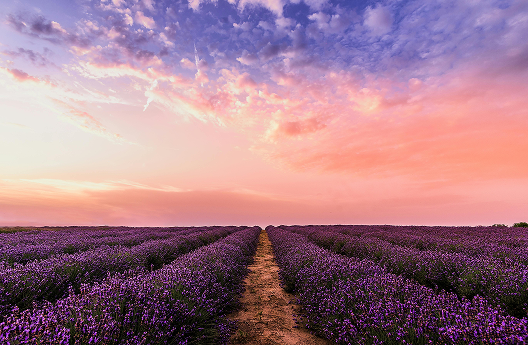
Save Time with Generated Palettes
Quickly create useful color palettes by uploading a photo, screenshot, artwork, or product image. HuesByIromi analyzes the image and turns its dominant colors into clean swatches you can copy, compare, and reuse in design or development work.
Effortless color sampling
The color picker allows you to sample any hue directly from an image and instantly add it to your design. With just a few clicks, you can capture primary, accent, and neutral colors that reflect the mood and style of your visual reference.
Create cohesive and flexible palettes
Once generated, your palettes can be reused across design files, websites, brand guides, social graphics, and product mockups. This makes it easy to:
- Maintain color consistency throughout your designs
- Experiment with new color combinations without starting from scratch
- Quickly iterate on branding or visual themes
Design faster with gradients and harmonized colors
Use the extracted colors to build gradients, define accent colors, and create a visual direction based on a real image. Because the colors come from the same source, the result often feels more natural than choosing unrelated colors manually.
Build custom color schemes in minutes
Whether you’re working on a website, mobile app, or brand identity, the tool helps you create custom color schemes in just a few clicks. It reduces guesswork and lets you focus on creativity rather than manual color matching.
Perfect for designers of all levels
From quick mockups to full design systems, generated palettes streamline your workflow and help you move seamlessly from inspiration to execution—turning images into functional, design-ready color systems.
Extract Color Palette From Image – Instantly Generate Beautiful Color Schemes
Looking for an easy way to extract a color palette from any image? Our online tool helps you instantly generate accurate, high-quality color schemes from photos, designs, and graphics. Whether you're a designer, artist, developer, or creator, extracting colors from an image has never been faster or simpler.
What Is an Image Color Palette Extractor?
An image color palette extractor is a tool that analyzes an uploaded picture and automatically picks out the dominant, secondary, and accent colors. It converts your image into a clean, organized color palette that you can use for:
- UI/UX designs
- Branding and logo design
- Illustration and digital art
- Social media graphics
- Website color themes
- Print materials
- Interior design inspiration
This helps you create visually consistent and professional-looking designs.
How to Extract a Color Palette From an Image
You can generate a palette in seconds:
- Upload any JPEG, or Png image
- Let the tool analyze the colors automatically
- View your extracted hex codes, RGB values, and swatches
- Copy the colors or download the palette
No setup, no software — everything happens instantly online.
How to review an extracted palette
Not every color from an image should be used with the same importance. Start by choosing one dominant color for the main brand or screen direction, then use secondary colors for supporting surfaces and accents. Dark and neutral colors are usually better for text, borders, and interface structure.
- Pick one primary color before adding accents
- Use neutral image colors for backgrounds and dividers
- Check contrast before placing text on extracted colors
- Remove colors that are too similar to keep the palette clear
This review step turns a raw extraction into a practical design palette that can support readable layouts and consistent branding.
Why Use a Color Palette Extractor?
✔ Accurate Color Detection
Automatically detect dominant and subtle colors from images with advanced color-picking algorithms.
✔ Perfect for Designers & Creators
Get ready-to-use palettes that match real-world images for branding and design projects.
✔ Save Time & Improve Workflow
No more manually picking colors in Photoshop or design tools.
✔ Supports Multiple File Types
Upload photos, screenshots, illustrations, or graphics in common formats.
✔ Ideal for Inspiration
Turn any photograph into a usable color theme — perfect for mood boards and creative direction.
Uses of Extracting Colors From an Image
🔹 Brand Identity Creation
Generate palettes from logos, product images, or brand photos.
🔹 UI/UX Design
Create color systems inspired by real visuals for web and app designs.
🔹 Digital Art & Photography
Analyze tones, highlights, and shadows to improve color accuracy.
🔹 Interior & Fashion Design
Extract aesthetic color combinations from decor, fabrics, or textures.
Understanding How Image-Based Color Palette Extraction Works
Extracting a color palette from an image involves analyzing each pixel to determine the most dominant and visually relevant colors. Our tool uses intelligent color clustering to identify tones, highlights, shadows, and key hues from your uploaded picture. This ensures the colors you get are accurate, meaningful, and ready to use for any design or creative project.
The process identifies:
- Dominant colors (most visible in the image)
- Accent colors (secondary shades that enrich the theme)
- Neutral tones (black, white, gray, or muted shades)
- Highlight colors that add depth and contrast
Whether your image is soft, pastel, bright, or monochrome, the extracted palette will reflect its exact color mood and style.
Why Color Palettes Matter in Design
A well-balanced color palette is a core part of visual design. The right combination of colors can transform the look and feel of a website, graphic, product, or brand. When you extract colors from an image, you capture natural harmony that already exists within the photo.
Benefits of using image-based color palettes:
- Enhances brand identity
- Improves UI/UX design consistency
- Helps maintain visual hierarchy
- Strengthens emotional impact
- Makes designs more memorable
- Speeds up creative workflow
Designers often take inspiration from nature, architecture, fashion, and photos — this tool makes it easy to convert that inspiration into actionable color codes.